
Two features in WSL-UI required digging deeper than I expected: renaming distributions and importing from container registries. Both taught me things about Windows and container ecosystems I didn't know before.
Renaming Distributions: The Registry Dance
Here's a fun fact: there's no wsl --rename command. If you want to rename a WSL distribution, you're on your own.
The official Microsoft guidance? Export the distribution, delete it, and import it with a new name. That works, but it's slow (especially for large distributions) and loses metadata.
I wanted something better.
Where WSL Stores Distribution Data
WSL keeps track of distributions in the Windows Registry:
HKEY_CURRENT_USER\Software\Microsoft\Windows\CurrentVersion\LxssUnder this key, each distribution has a subkey named with its GUID:
Lxss\
  {12345678-1234-1234-1234-123456789abc}\
    DistributionName: "Ubuntu"
    BasePath: "C:\Users\username\AppData\Local\Packages\..."
    Version: 2
    State: 1
    DefaultUid: 1000
    ...
The GUID is the true identifier. The DistributionName is just a label.

The Rename Process
Renaming turns out to be straightforward — change the DistributionName value:
use winreg::enums::*;
use winreg::RegKey;

fn rename_distribution_registry(
    guid: &str,
    new_name: &str
) -> Result<(), WslError> {
    let hkcu = RegKey::predef(HKEY_CURRENT_USER);
    let lxss_path = format!(
        r"Software\Microsoft\Windows\CurrentVersion\Lxss\{}",
        guid
    );

    let key = hkcu.open_subkey_with_flags(&lxss_path, KEY_WRITE)?;
    key.set_value("DistributionName", &new_name)?;

    Ok(())
}
But there's a catch: the distribution must be stopped. If it's running, the registry changes won't take effect until the next WSL restart, and the UI will be confused about the current state.
What Else Changes?
A distribution name appears in several places beyond the registry:
1. Windows Terminal Profile
If you installed the distro from the Microsoft Store, it likely has a Windows Terminal profile fragment at:
%LOCALAPPDATA%\Packages\Microsoft.WindowsTerminal_*\LocalState\profiles\{GUID}.jsonThis JSON file contains the displayed name:
{
    "guid": "{12345678-1234-1234-1234-123456789abc}",
    "name": "Ubuntu",
    "commandline": "wsl.exe -d Ubuntu"
}
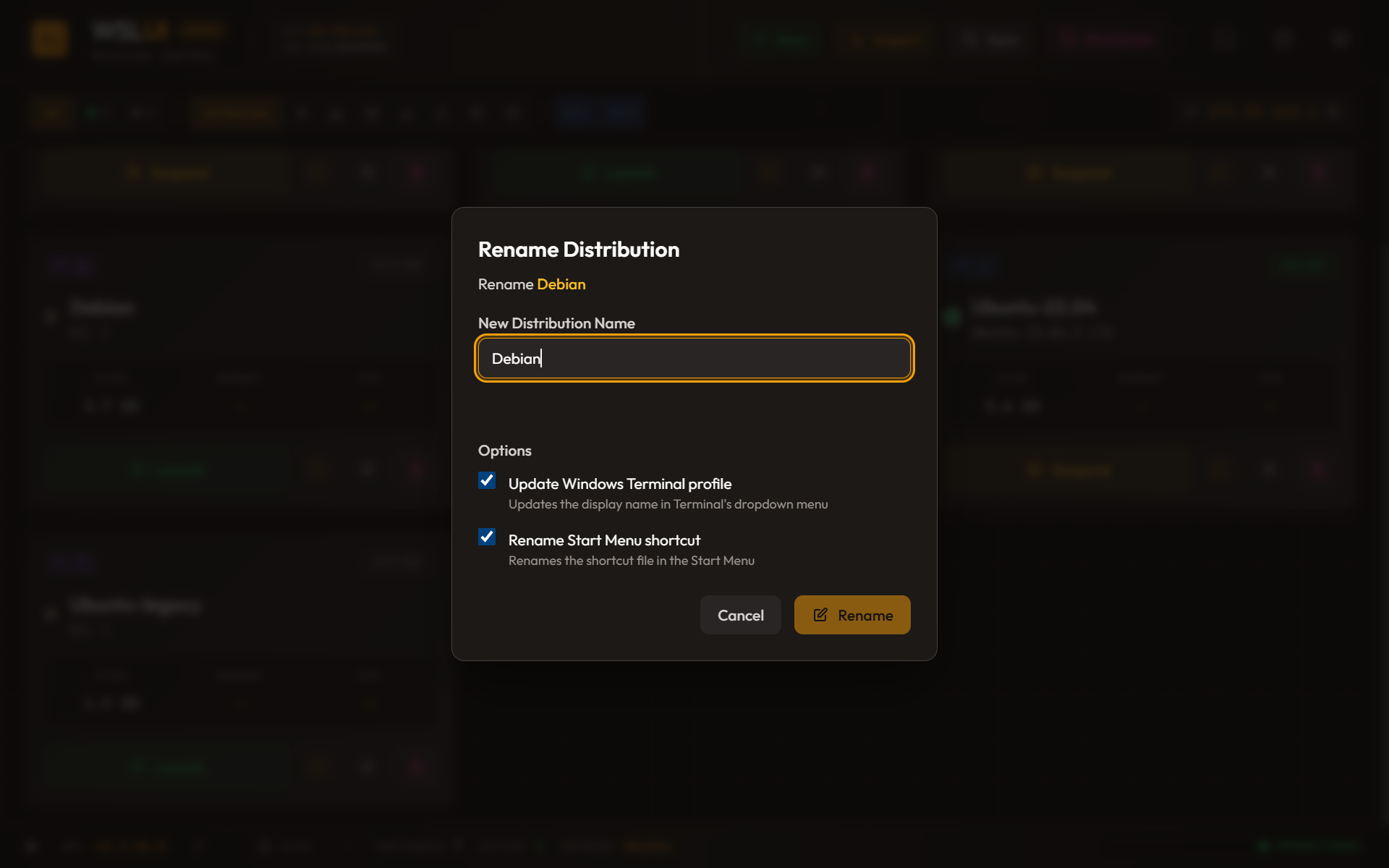
WSL-UI offers to update this file — changing both the name field and the -d argument in the commandline.
2. Start Menu Shortcut
Store-installed distributions create a shortcut at:
%APPDATA%\Microsoft\Windows\Start Menu\Programs\{DistroName}.lnkRenaming this requires finding the shortcut (path stored in registry), renaming the file, and updating the registry to reflect the new location.
3. WSL Config Files
The global ~/.wslconfig and per-distribution /etc/wsl.conf might reference the distribution by name. WSL-UI warns about this but doesn't automatically edit these files — too risky to modify user configuration without explicit consent.
The Validation Gauntlet
Before attempting a rename, WSL-UI validates:
fn validate_rename(
    current_name: &str,
    new_name: &str,
    all_distributions: &[Distribution]
) -> Result<(), RenameError> {
    // 1. Not empty
    if new_name.is_empty() {
        return Err(RenameError::EmptyName);
    }

    // 2. No invalid characters
    let invalid_chars = ['<', '>', ':', '"', '/', '\\', '|', '?', '*'];
    if new_name.chars().any(|c| invalid_chars.contains(&c)) {
        return Err(RenameError::InvalidCharacters);
    }

    // 3. Not too long
    if new_name.len() > 64 {
        return Err(RenameError::TooLong);
    }

    // 4. No duplicate names
    if all_distributions.iter().any(|d|
        d.name.eq_ignore_ascii_case(new_name) && d.name != current_name
    ) {
        return Err(RenameError::DuplicateName);
    }

    // 5. Distribution must be stopped
    // (checked separately before the actual rename)

    Ok(())
}
Container Imports: OCI Without Docker
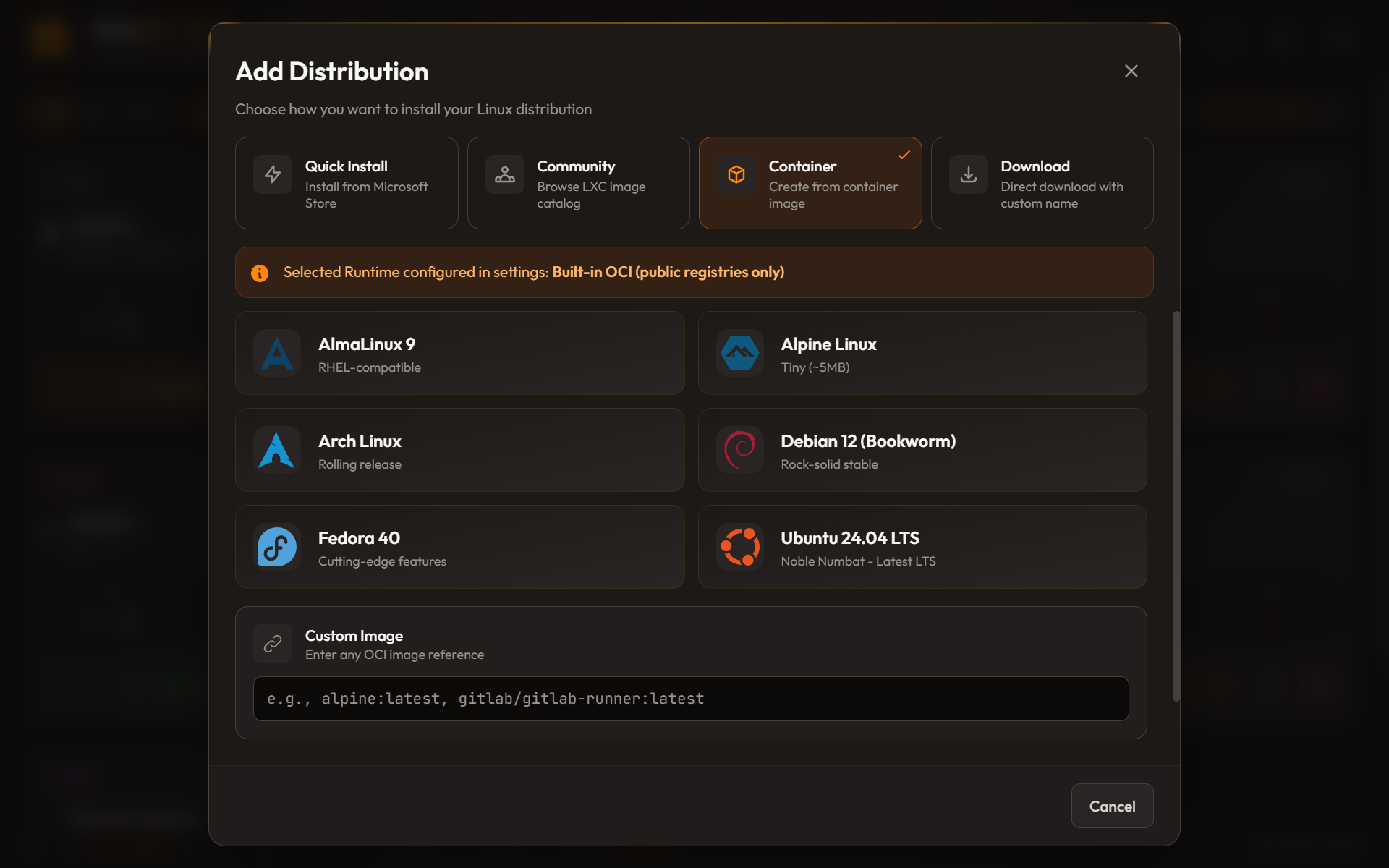
The second feature I want to highlight is importing distributions from container images. WSL has wsl --import which accepts a tarball, but where do you get that tarball?
The traditional approach: pull an image with Docker, export a container, import to WSL. But that requires Docker Desktop, which is heavy and has licensing considerations.
I wanted to pull directly from registries.
The OCI Image Format
Container images aren't magic. They're just:
- A manifest — JSON describing the image metadata and layers
- One or more layers — gzipped tarballs containing filesystem changes
- A config — JSON with runtime settings (entrypoint, env vars, etc.)
The Docker Registry HTTP API V2 provides endpoints to fetch these:
GET /v2/{name}/manifests/{reference}  → manifest JSON
GET /v2/{name}/blobs/{digest}         → layer tarball
Building the Registry Client
The client handles two main concerns: authentication and downloading.
pub struct RegistryClient {
    client: reqwest::Client,
    token: Option<String>,
}

impl RegistryClient {
    pub fn new() -> Self {
        Self {
            client: reqwest::Client::builder()
                .timeout(Duration::from_secs(300))
                .build()
                .unwrap(),
            token: None,
        }
    }

    fn registry_url(&self, registry: &str) -> String {
        // Special case: docker.io → registry-1.docker.io
        if registry == "docker.io" {
            "https://registry-1.docker.io".to_string()
        } else if registry.starts_with("http") {
            registry.to_string()
        } else {
            format!("https://{}", registry)
        }
    }
}
Authentication Dance
Public registries like Docker Hub allow anonymous pulls for public images. But even then, you need a token. The flow:
- Make an unauthenticated request
- Get a
401 UnauthorizedwithWWW-Authenticateheader - Parse the header to find the token endpoint
- Request a token (with credentials if needed)
- Use the token for subsequent requests
async fn authenticate(
    &mut self,
    registry: &str,
    repository: &str
) -> Result<(), OciError> {
    // Try unauthenticated first
    let url = format!(
        "{}/v2/{}/manifests/latest",
        self.registry_url(registry),
        repository
    );

    let response = self.client.get(&url).send().await?;

    if response.status() == 401 {
        // Parse WWW-Authenticate header
        // Format: Bearer realm="...",service="...",scope="..."
        if let Some(www_auth) = response.headers().get("www-authenticate") {
            self.token = self.get_bearer_token(www_auth, repository).await?;
        }
    }

    Ok(())
}
For private registries (including private Docker Hub repos and corporate registries), you pass credentials:
async fn get_bearer_token(
    &self,
    www_auth: &str,
    repository: &str,
    credentials: Option<&Credentials>
) -> Result<Option<String>, OciError> {
    let realm = extract_param(www_auth, "realm")?;
    let service = extract_param(www_auth, "service")?;

    let url = format!(
        "{}?service={}&scope=repository:{}:pull",
        realm, service, repository
    );

    let mut request = self.client.get(&url);

    if let Some(creds) = credentials {
        request = request.basic_auth(&creds.username, Some(&creds.password));
    }

    let response = request.send().await?;
    let token_response: TokenResponse = response.json().await?;

    Ok(token_response.token)
}
Layer Merging on Windows
Here's where it gets interesting. OCI images use layers. Each layer builds on the previous one, adding or removing files. To create a usable rootfs, you need to merge them.
On Linux, you'd extract each layer and let the filesystem handle overwrites. On Windows? No such luck. Windows doesn't understand Linux symlinks, and extracting layers would break them.
The solution: merge layers in tar format, never extracting to the Windows filesystem.
fn merge_layers_to_tar(
    layer_paths: &[PathBuf],
    output_path: &Path
) -> Result<(), OciError> {
    let mut entries: HashMap<String, TarEntry> = HashMap::new();
    let mut deleted: HashSet<String> = HashSet::new();

    // Process layers in order (base first, top last)
    for layer_path in layer_paths {
        let file = File::open(layer_path)?;
        let decoder = GzDecoder::new(file);
        let mut archive = tar::Archive::new(decoder);

        for entry in archive.entries()? {
            let entry = entry?;
            let path = entry.path()?.to_string_lossy().to_string();

            // Handle OCI whiteout files (deletions)
            if path.contains(".wh.") {
                let deleted_path = path.replace(".wh.", "");
                deleted.insert(deleted_path);
                continue;
            }

            // Skip if this path was deleted by a later layer
            if deleted.contains(&path) {
                continue;
            }

            // Later layers override earlier ones
            entries.insert(path, TarEntry::from(entry));
        }
    }

    // Write merged entries to output tar
    let output = File::create(output_path)?;
    let mut builder = tar::Builder::new(output);

    for (path, entry) in entries {
        builder.append(&entry.header, &entry.data)?;
    }

    builder.finish()?;
    Ok(())
}
Podman Integration
For authenticated registries where users already have Podman configured, WSL-UI can delegate to Podman:
async fn pull_with_podman(
    image_ref: &str,
    output_dir: &Path
) -> Result<PathBuf, OciError> {
    // Pull the image
    Command::new("podman")
        .args(["pull", image_ref])
        .output()?;

    // Create a container (not running)
    let container_id = Command::new("podman")
        .args(["create", image_ref])
        .output()?;

    // Export the filesystem
    let output_path = output_dir.join("rootfs.tar");
    Command::new("podman")
        .args(["export", &container_id, "-o", output_path.to_str().unwrap()])
        .output()?;

    // Clean up
    Command::new("podman")
        .args(["rm", &container_id])
        .output()?;

    Ok(output_path)
}
This is useful because Podman respects ~/.docker/config.json for credentials, handles multi-arch images automatically, and deals with registry quirks I might not have handled.
Lessons Learned
On the Registry work:
- The Windows Registry is surprisingly accessible from Rust via the
winregcrate - Always stop distributions before modifying their registry entries
- Windows Terminal fragments are underdocumented but easy to edit once you find them
On OCI imports:
- Container registries are just HTTP APIs — no magic
- The authentication dance is fiddly but well-documented (Docker's spec is public)
- Windows filesystem limitations require creative solutions (merge in tar format)
- Podman is a great fallback for edge cases
Coming up next: the adventure of getting a Tauri app into the Microsoft Store, including MSIX packaging and the Partner Center maze.
Try It Yourself
WSL-UI is open source and available on:
- Microsoft Store: Search for "WSL UI" or visit the store listing
- Direct Download: Official Website
- GitHub: github.com/octasoft-ltd/wsl-ui