
I had some time over Christmas and was in the mood for trying something new. My day job is DevOps — pipelines, infrastructure, the usual. But I'd been itching to build something different. A proper desktop app. Something that scratches my own itch.
That itch? Managing WSL2 distributions on Windows.
The Problem
If you've used WSL2 for any length of time, you know the pain. You end up with a handful of distributions — maybe Ubuntu for general work, Debian for something specific, Alpine because it's tiny, and perhaps a few others you've imported from containers or downloaded from various places.
Managing them means remembering command-line incantations:
wsl --list --verbose
wsl --terminate Ubuntu
wsl --export Ubuntu ./ubuntu-backup.tar
wsl --import NewDistro C:\WSL\NewDistro ./some-rootfs.tar
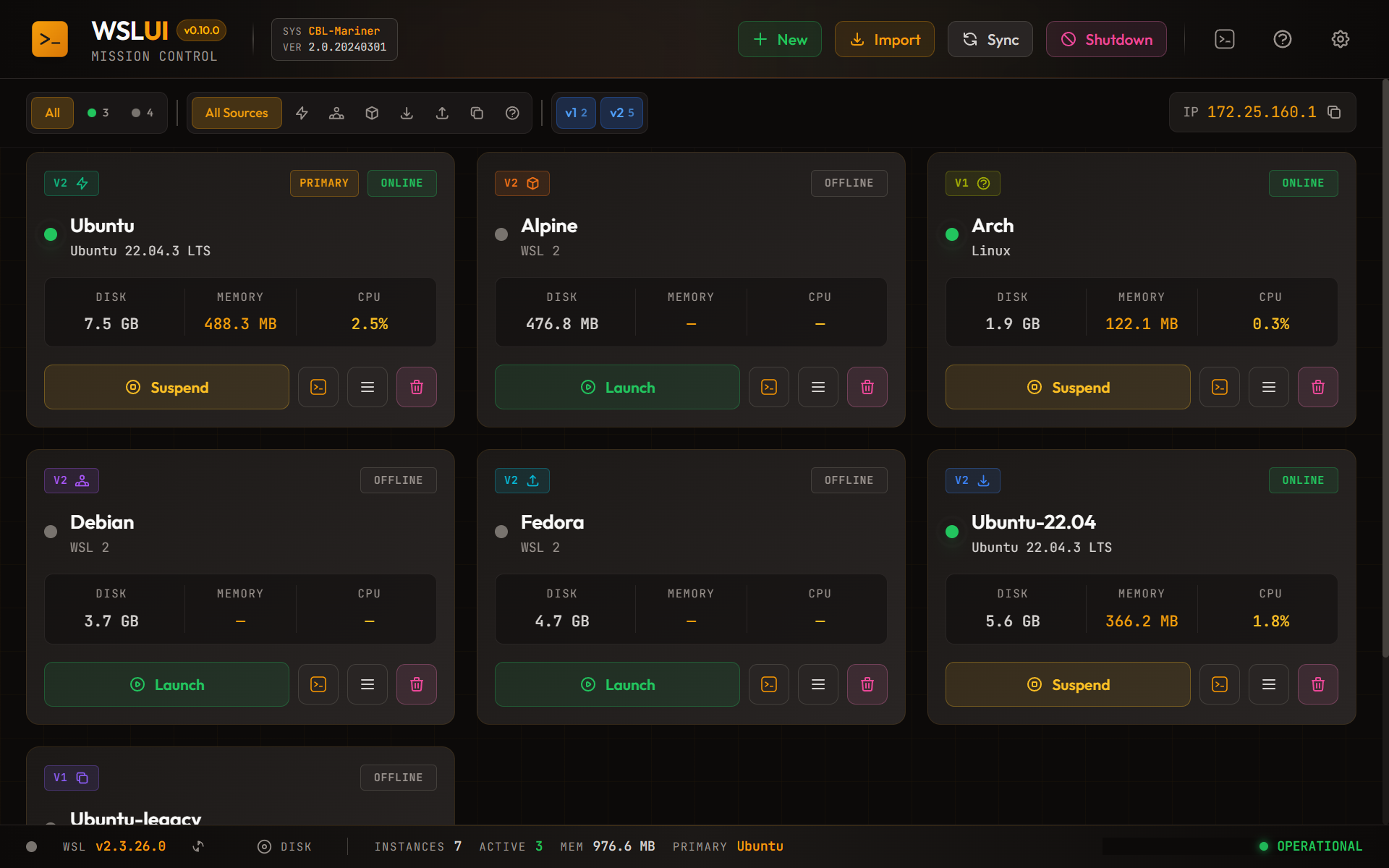
It's not terrible, but it's not great either. I wanted something visual. Something that shows me what's running, how much memory each distro is using, and lets me do common tasks with a click or two.
Why Tauri?
When it comes to building cross-platform desktop apps with web technologies, Electron is the obvious choice. It's mature, well-documented, and powers apps like VS Code and Slack.
But Electron has a reputation for bloat. Each app ships with its own Chromium browser and Node.js runtime. A simple "Hello World" weighs in at around 150MB.
Tauri takes a different approach. Instead of bundling a browser, it uses the operating system's native WebView — on Windows, that's WebView2 (Chromium-based, but shared across all apps). The backend is written in Rust, which compiles to a small native binary.
The result? A Tauri app can be under 10MB. Mine is around 4MB for the portable executable (installer packages are a bit bigger).

There were other reasons too:
- Rust for the backend — I wanted to learn Rust properly. Building something real is the best way.
- Native Windows integration — Tauri made it easy to call Windows APIs and run shell commands.
- Security model — Tauri's permission system is more restrictive by default. The frontend can only call explicitly allowed backend functions.
The Tech Stack
Here's what I ended up with:
Frontend:
- React 19 with TypeScript
- Zustand for state management (simpler than Redux, fewer abstractions)
- Tailwind CSS 4 for styling
- Vite for the build toolchain
Backend:
- Tauri 2.5 (the Rust framework)
- Custom
wsl-corecrate for parsing WSL output winregfor Windows Registry accessreqwestfor HTTP (needed for OCI registry pulls)
Testing:
- Vitest for unit tests
- WebdriverIO with Tauri Driver for E2E tests
The First Working Version
The initial version was simple: list distributions and show their state. Tauri's command system made this straightforward.
On the Rust side:
#[tauri::command]
pub async fn list_distributions() -> Result<Vec<Distribution>, String> {
    // Run wsl --list --verbose and parse the output
    let output = Command::new("wsl")
        .args(["--list", "--verbose"])
        .output()
        .map_err(|e| e.to_string())?;

    // Parse and return
    parse_wsl_list(&output.stdout)
}
On the React side:
import { invoke } from '@tauri-apps/api/core';

async function loadDistributions() {
  const distros = await invoke<Distribution[]>('list_distributions');
  setDistributions(distros);
}
That's it. No complex IPC setup, no serialization boilerplate. Tauri handles the bridge between JavaScript and Rust.
What Came Next
That simple list view was just the beginning. Over the following weeks, I added:
- Resource monitoring — Memory usage, CPU percentage, disk sizes
- Distribution management — Start, stop, terminate, set default
- Import/Export — Backup and restore distributions as tar files
- Container imports — Pull OCI images directly from registries
- Renaming — Change distribution names (involves Windows Registry surgery)
- Custom actions — User-defined shell commands per distribution
The Learning Curve
Rust has a reputation for being difficult, and it's not undeserved. The borrow checker caught me out repeatedly. But here's the thing — once your code compiles, it usually works correctly. The bugs I spent hours debugging in other languages (null pointers, race conditions, use-after-free) simply don't happen.
Tauri 2.0 was released during my development, which meant updating from 1.x to 2.x. The migration was mostly straightforward, but some APIs changed significantly. The plugin system was completely overhauled.
The frontend was the easy part. React is React, and Tailwind makes styling fast. Zustand was a breath of fresh air after years of Redux — just create a store with your state and functions, no actions/reducers/middleware ceremony.
What's Coming in This Series
This is the first post in a series about building WSL-UI. In upcoming posts, I'll cover:
- Mock Mode — Building a fake WSL environment for testing and development
- Registry Surgery — How renaming distributions works under the hood
- OCI Without Docker — Pulling container images directly from registries
- Microsoft Store Publishing — The journey from Tauri to MSIX to Store listing
- E2E Testing — Screenshot generation and video recording with WebdriverIO
- Polish and Analytics — UI development pains from a backend perspective, and privacy-first analytics
Try It Yourself
WSL-UI is open source and available on:
- Microsoft Store: Search for "WSL UI" or visit the store listing
- Direct Download: Official Website
- GitHub: github.com/octasoft-ltd/wsl-ui
If you're curious about Tauri or want to see how the pieces fit together, the code is all there. I've tried to keep it well-organized and reasonably documented.
Next up: how I built a complete mock mode that lets me develop and test without touching real WSL distributions.