
Permission sets are the heart of IAM Identity Center. They define what users can do - like IAM policies, but designed for multi-account access.
Getting permission sets right means balancing least privilege with letting people do their jobs. Here are the permission sets we use and why.
Anatomy of a Permission Set
A permission set has several components:
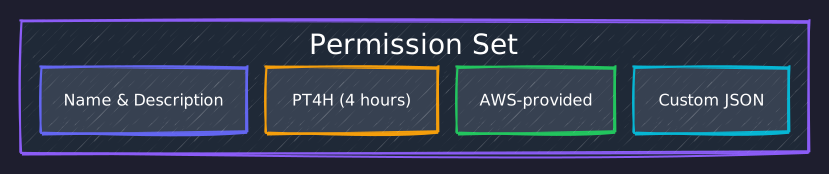
Name: Identifier used in assignments.
Description: Human-readable explanation of the permission set's purpose.
Session Duration: How long credentials remain valid after assumption. See permission set properties for the full list of configurable options.
Managed Policies: AWS-provided policies attached to the permission set.
Inline Policy: Custom policy embedded in the permission set.
Permissions Boundary (optional): Maximum permissions regardless of attached policies.
The Permission Sets
We use several permission sets for different access patterns:
AdministratorAccess
Full access for platform administrators:
"AdministratorAccess" = {
  description      = "Full administrative access"
  session_duration = "PT4H"
  managed_policies = ["arn:aws:iam::aws:policy/AdministratorAccess"]
}
Session duration: 4 hours (PT4H in ISO 8601 duration format). Long enough for substantial work, short enough to force re-authentication.
When to use: Platform administration, emergency access, initial setup.
Who gets it: Platform administrators only.
BillingFullAccess
Cost and billing management:
"BillingFullAccess" = {
  description      = "Full billing and cost management access"
  session_duration = "PT8H"
  managed_policies = ["arn:aws:iam::aws:policy/job-function/Billing"]
  inline_policy = jsonencode({
    Version = "2012-10-17"
    Statement = [
      {
        Effect = "Allow"
        Action = [
          "ce:*",           # Cost Explorer
          "budgets:*",      # Budgets
          "cur:*",          # Cost and Usage Reports
          "savingsplans:*", # Savings Plans
          "organizations:ListAccounts",
          "organizations:DescribeOrganization"
        ]
        Resource = "*"
      }
    ]
  })
}
Session duration: 8 hours. Billing work often involves lengthy analysis.
Note: The managed Billing policy doesn't include Cost Explorer and Budgets, hence the inline policy supplement.
DNSManagement
Route 53 and related services:
"DNSManagement" = {
  description      = "DNS management access for Route53 and related services"
  session_duration = "PT8H"
  managed_policies = ["arn:aws:iam::aws:policy/AmazonRoute53FullAccess"]
  inline_policy = jsonencode({
    Version = "2012-10-17"
    Statement = [
      {
        Effect = "Allow"
        Action = [
          "acm:ListCertificates",
          "acm:DescribeCertificate",
          "acm:RequestCertificate",
          "cloudfront:ListDistributions",
          "cloudfront:GetDistribution",
          "logs:CreateLogGroup",
          "logs:CreateLogStream",
          "logs:PutLogEvents"
        ]
        Resource = "*"
      }
    ]
  })
}
Inline additions: ACM for certificate management, CloudFront for CDN reference, CloudWatch Logs for query logging.
SupportFullAccess
AWS Support and Trusted Advisor:
"SupportFullAccess" = {
  description      = "Full AWS Support access including Trusted Advisor"
  session_duration = "PT8H"
  managed_policies = ["arn:aws:iam::aws:policy/AWSSupportAccess"]
}
Use case: Reviewing Trusted Advisor recommendations, opening support cases.
RootAccessManager
Centralised root access management (newer AWS feature):
"RootAccessManager" = {
  description      = "Centralized root access management for member accounts"
  session_duration = "PT4H"
  managed_policies = [
    "arn:aws:iam::aws:policy/AWSOrganizationsReadOnlyAccess",
    "arn:aws:iam::aws:policy/IAMReadOnlyAccess"
  ]
  inline_policy = jsonencode({
    Version = "2012-10-17"
    Statement = [
      {
        Effect = "Allow"
        Action = [
          "sts:AssumeRoot",
          "iam:EnableOrganizationsRootCredentialsManagement",
          "iam:DisableOrganizationsRootCredentialsManagement",
          "iam:GetOrganizationsRootCredentialsManagementStatus"
        ]
        Resource = "*"
      }
    ]
  })
}
This permission set uses sts:AssumeRoot to access member account root capabilities without knowing the root password. It's part of AWS's centralised root access management feature.
Session Duration Considerations
Session duration affects security and usability:
| Duration | Use Case | Trade-off |
|---|---|---|
| 1 hour | Highly sensitive operations | Frequent re-authentication |
| 4 hours | General administration | Good balance |
| 8 hours | Extended work sessions | Longer exposure window |
| 12 hours | Maximum allowed | Use sparingly |
AWS recommends "don't set session duration longer than needed." We default to 4 hours for admin access and 8 hours for less sensitive work like billing review.
Account Assignments
Permission sets become useful when assigned to accounts:
account_assignments = {
  # Management account - full access for platform admins
  "platform-admins-management" = {
    permission_set = "AdministratorAccess"
    principal_type = "GROUP"
    principal_name = "PlatformAdministrators"
    target_type    = "AWS_ACCOUNT"
    target_id      = "123456789012"  # Management account
  }

  # Management account - billing for platform admins
  "platform-admins-billing" = {
    permission_set = "BillingFullAccess"
    principal_type = "GROUP"
    principal_name = "PlatformAdministrators"
    target_type    = "AWS_ACCOUNT"
    target_id      = "123456789012"
  }

  # DNS account - DNS management for platform admins
  "platform-admins-dns" = {
    permission_set = "DNSManagement"
    principal_type = "GROUP"
    principal_name = "PlatformAdministrators"
    target_type    = "AWS_ACCOUNT"
    target_id      = "111111111111"  # DNS account
  }
}
Each assignment is a combination of:
- Who: Group or user
- What: Permission set
- Where: Target account
The same permission set can be assigned to multiple accounts. The same group can have different permission sets in different accounts.
The Assignment Matrix
The full access matrix for the current setup:
| Group | Management | DNS | Website-Prod |
|---|---|---|---|
| PlatformAdministrators | Admin, Billing, Support, RootAccess | Admin, DNS, Support | Admin, Support |
Each cell is a separate account_assignments entry following the same pattern shown above. As more groups are added (Developers, Auditors), new rows appear in this matrix with more targeted permission sets.
Custom vs Managed Policies
When should you use AWS managed policies versus custom inline policies?
| Policy type | Use when | Trade-off |
|---|---|---|
| AWS managed policy | AWS already has the right policy (AdministratorAccess, ReadOnlyAccess, etc.) and you want AWS-maintained updates | Fast to adopt, but often broader than ideal |
| Inline policy | You need tighter scope, combined access patterns, or resource-level conditions | More precise, but you maintain it yourself |
We typically start with managed policies and add inline policies to fill gaps or add restrictions.
Deployment Permissions
We also create permission sets specifically for assuming deployment roles:
"IdentityMgmtDeploymentAccess" = {
  description      = "Permission to assume IdentityManagementDeploymentRole"
  session_duration = "PT2H"
  inline_policy = jsonencode({
    Version = "2012-10-17"
    Statement = [
      {
        Effect   = "Allow"
        Action   = ["sts:AssumeRole", "sts:TagSession"]
        Resource = "arn:aws:iam::123456789012:role/IdentityManagementDeploymentRole"
      }
    ]
  })
}
This follows the pattern: Identity Center grants the ability to assume a specific IAM role, and the IAM role has the actual deployment permissions. More on this in Part 8.
Permission Set Provisioning
After creating or modifying a permission set, AWS provisions it to assigned accounts. This can take 5-10 minutes.
In Terraform, this manifests as delayed resource creation. The permission set exists, but account assignments might not work immediately. In CI/CD pipelines, we handle this by separating permission set creation from assignments that depend on them - run them in separate pipeline stages rather than a single tofu apply.
Summary
Permission sets should be:
- Purposeful: Clear use case for each one
- Scoped: Only the permissions needed for that use case
- Documented: Description explains the intent
- Time-limited: Appropriate session duration
The goal is that users can do their jobs without excessive privileges. When someone needs access to a new account or capability, the answer should be a permission set assignment - not "just give them admin."