
The bootstrap script from Part 2 gave us a cluster with ArgoCD installed. But ArgoCD is just sitting there, doing nothing. In this post, I'll explain how I use the app-of-apps pattern to deploy and manage everything else.
The Problem: Too Many Things to Deploy
My homelab runs a lot of stuff:
- Istio service mesh (4 components with specific ordering)
- cert-manager for TLS certificates
- MetalLB for LoadBalancer services
- PostgreSQL, Kafka, Redis, MinIO
- Grafana, Loki, Tempo, Mimir (the LGTM observability stack)
- A private Docker registry
- GitLab runners for CI/CD
- And more...
I could deploy each of these manually with helm install and kubectl apply. But that's not GitOps. And it's definitely not repeatable when I inevitably nuke the cluster and start over.
The Solution: App-of-Apps
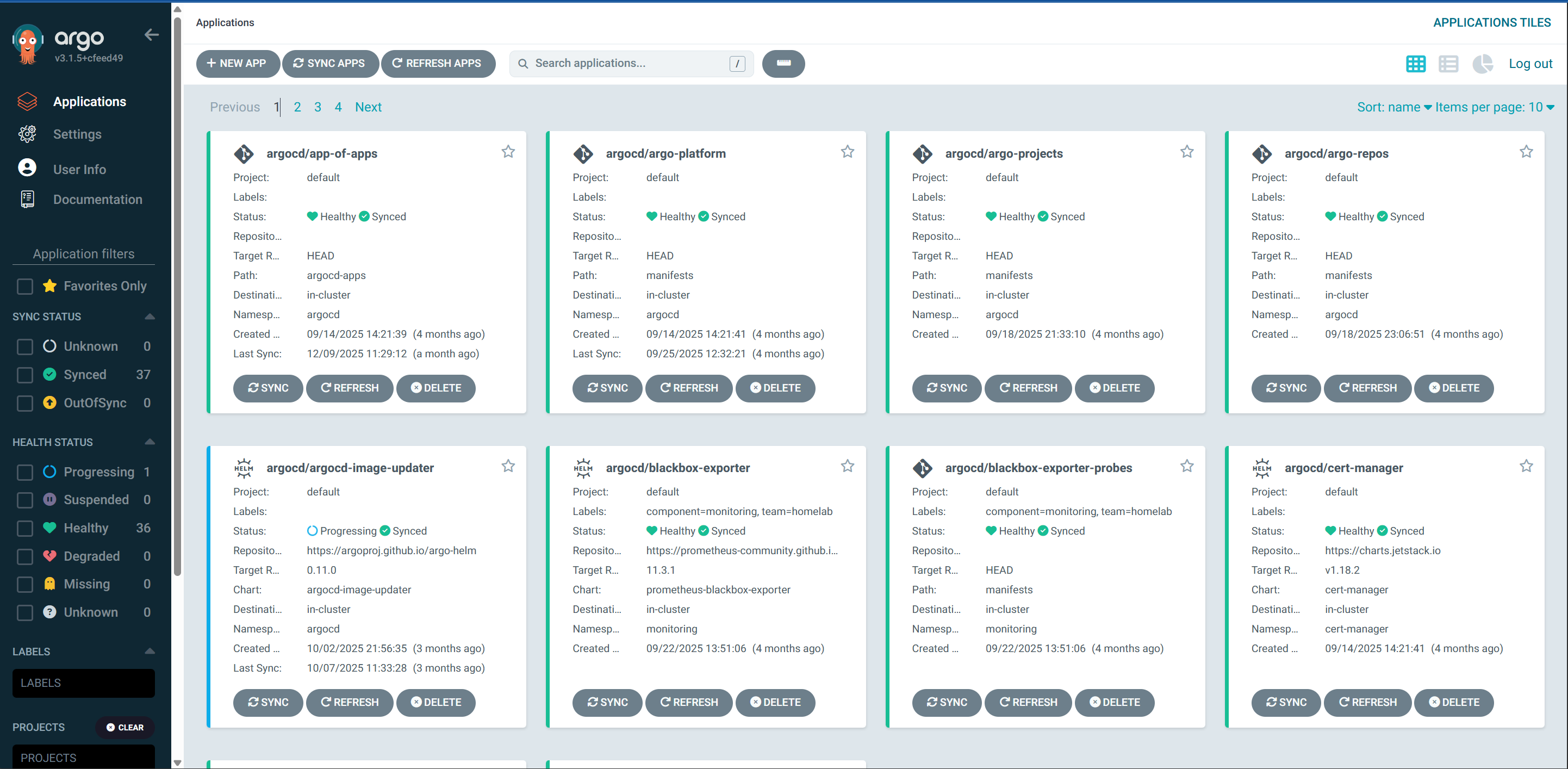
The app-of-apps pattern is simple: create one ArgoCD Application that points to a directory of other Application manifests. ArgoCD reads the directory, creates all the Applications it finds, and each of those Applications deploys their respective workloads.

One Application to rule them all.
Bootstrapping with OpenTofu
The catch-22: ArgoCD needs the app-of-apps Application to exist, but we can't create it via GitOps because ArgoCD isn't managing anything yet.
I use OpenTofu (Terraform fork) to create the initial app-of-apps:
resource "argocd_application" "app_of_apps" {
  metadata {
    name      = "app-of-apps"
    namespace = "argocd"
  }

  spec {
    project = "default"

    source {
      repo_url        = "https://gitlab.com/your-org/homelab.git"
      path            = "argocd-apps"
      target_revision = "main"
      directory {
        recurse = true
      }
    }

    destination {
      server    = "https://kubernetes.default.svc"
      namespace = "argocd"
    }

    sync_policy {
      automated {
        prune     = true
        self_heal = true
      }
      retry {
        limit = 5
        backoff {
          duration     = "5s"
          max_duration = "3m"
          factor       = 2
        }
      }
    }
  }
}
After tofu apply, ArgoCD picks up the app-of-apps, reads the argocd-apps/ directory, and starts creating Applications.

Sync Waves: Order Matters
Some things need to be installed before others. You can't configure Istio routing until Istio is installed. You can't create Certificates until cert-manager is running.

ArgoCD's sync waves solve this. Each Application gets a sync wave annotation:
# istio-base.yaml
apiVersion: argoproj.io/v1alpha1
kind: Application
metadata:
  name: istio-base
  annotations:
    argocd.argoproj.io/sync-wave: "1"
spec:
  source:
    repoURL: https://istio-release.storage.googleapis.com/charts
    chart: base
    targetRevision: 1.23.2
  # ...

# istio-cni.yaml
apiVersion: argoproj.io/v1alpha1
kind: Application
metadata:
  name: istio-cni
  annotations:
    argocd.argoproj.io/sync-wave: "2"
# ...

# istiod.yaml
apiVersion: argoproj.io/v1alpha1
kind: Application
metadata:
  name: istiod
  annotations:
    argocd.argoproj.io/sync-wave: "3"
# ...
ArgoCD deploys wave 1 first, waits for it to be healthy, then wave 2, and so on. For Istio, this means:
istio-base(CRDs and basic resources)istio-cni(CNI plugin for ambient mode)istiod(control plane)ztunnel(ambient mode data plane)
Without sync waves, ArgoCD would try to deploy everything at once and fail because CRDs don't exist yet.
Multisource Applications
Some deployments need both a Helm chart AND custom manifests. For example, MinIO needs:
- The official MinIO Helm chart
- Custom HTTPRoute for Gateway API ingress
- ExternalSecret to pull credentials from Infisical
ArgoCD's multisource feature handles this:
apiVersion: argoproj.io/v1alpha1
kind: Application
metadata:
  name: minio
spec:
  sources:
    # Source 1: Official Helm chart
    - repoURL: https://charts.min.io/
      chart: minio
      targetRevision: 5.4.0
      helm:
        values: |
          mode: standalone
          replicas: 1
          resources:
            requests:
              memory: 512Mi

    # Source 2: Custom manifests from our repo
    - repoURL: https://gitlab.com/your-org/homelab.git
      path: manifests
      targetRevision: main
      directory:
        include: "minio-*.yaml"

  destination:
    server: https://kubernetes.default.svc
    namespace: minio
The directory.include pattern lets me keep all my custom manifests in one manifests/ directory while only pulling the relevant ones for each application.
Self-Healing and Auto-Sync
Every Application has automated sync enabled:
sync_policy:
  automated:
    prune: true      # Delete resources removed from git
    self_heal: true  # Revert manual changes
This is GitOps in action. If someone manually edits a deployment, ArgoCD reverts it. If I delete an Application YAML from git, ArgoCD removes it from the cluster.
The retry policy is important for the initial deployment:
retry:
  limit: 5
  backoff:
    duration: "5s"
    max_duration: "3m"
    factor: 2
Some Applications fail on first sync because dependencies aren't ready yet. The exponential backoff gives things time to settle.
A Typical Application Manifest
Here's what a standard Application looks like:
# cert-manager.yaml
apiVersion: argoproj.io/v1alpha1
kind: Application
metadata:
  name: cert-manager
  namespace: argocd
  finalizers:
    - resources-finalizer.argocd.argoproj.io
spec:
  project: default

  source:
    repoURL: https://charts.jetstack.io
    chart: cert-manager
    targetRevision: v1.16.2
    helm:
      values: |
        crds:
          enabled: true
        resources:
          requests:
            cpu: 10m
            memory: 32Mi

  destination:
    server: https://kubernetes.default.svc
    namespace: cert-manager

  syncPolicy:
    automated:
      prune: true
      selfHeal: true
    syncOptions:
      - CreateNamespace=true
Key points:
finalizers: Ensures resources are cleaned up when Application is deletedCreateNamespace=true: ArgoCD creates the namespace if it doesn't exist- Resource requests are tuned low - this is a homelab, not production
The argocd-apps Directory Structure
argocd-apps/
├── argo-platform.yaml          # ArgoCD configuration
├── argo-projects.yaml          # ArgoCD projects
├── argo-repos.yaml             # Repository credentials
│
├── istio-base.yaml             # Sync wave 1
├── istio-cni.yaml              # Sync wave 2
├── istiod.yaml                 # Sync wave 3
├── ztunnel.yaml                # Sync wave 4
├── istio-gateway.yaml          # Gateway configuration
│
├── cilium.yaml                 # CNI management
├── metallb-system.yaml         # Load balancer
├── cert-manager.yaml           # TLS certificates
├── letsencrypt.yaml            # ACME issuer
│
├── postgres.yaml               # Database
├── kafka.yaml                  # Event streaming
├── redis-multisource.yaml      # Cache + custom routes
├── minio-multisource.yaml      # Object storage
│
├── lgtm-stack.yaml             # Observability
├── k8s-monitoring.yaml         # Metrics
│
└── ... (and more)
30+ Applications, all managed from one directory. Add a new YAML file, commit, push, and ArgoCD deploys it.
External Secrets Integration
I mentioned ExternalSecrets for MinIO. Here's how that works:
# manifests/minio-external-secret.yaml
apiVersion: external-secrets.io/v1beta1
kind: ExternalSecret
metadata:
  name: minio-credentials
  namespace: minio
spec:
  refreshInterval: 1h
  secretStoreRef:
    name: infisical-store
    kind: ClusterSecretStore
  target:
    name: minio-credentials
  data:
    - secretKey: rootUser
      remoteRef:
        key: /minio/MINIO_ROOT_USER
    - secretKey: rootPassword
      remoteRef:
        key: /minio/MINIO_ROOT_PASSWORD
Infisical holds the actual credentials. External Secrets Operator syncs them into Kubernetes Secrets. The Helm chart references the Secret. No credentials in git.
The Joy of Drift Detection
My favourite ArgoCD feature is seeing when something drifts from the desired state. Someone manually scaled a deployment? ArgoCD shows it as "OutOfSync" and reverts it.
This has saved me multiple times when I "temporarily" changed something and forgot to revert it.
What I'd Change
ArgoCD multi-namespace support: Currently, all Applications live in the argocd namespace. There's work in progress to support Applications in other namespaces, which would be cleaner for multi-tenant setups. When that lands, I'll reorganise.
Application sets: For similar applications (like per-environment deployments), ApplicationSets would reduce duplication. I haven't needed it yet for this homelab, but it's on the list.
What's Next
The cluster is now deploying applications automatically. But we haven't talked about the service mesh yet - Cilium and Istio running together, and the ztunnel certificate issues that caused me grief. That's Part 4.
Related: Once the cluster is running, see GitLab Runner on Kubernetes for how I deploy self-hosted CI/CD using these same ArgoCD and External Secrets patterns.
This is Part 3 of the Homelab Kubernetes Series on building a homelab Kubernetes setup on Windows.