
I thought my site's SEO was in decent shape. I write blog posts with frontmatter metadata, generate Open Graph images for each post, and use structured data for FAQ rich results. Then Maptrics crawled my site and found 24 unique issues with over 1,600 total occurrences across 81 URLs.

This isn't a story about a tool failing me — it's about a tool showing me what I couldn't see. Maptrics is a young startup building an SEO regression detection platform, and after using their free tier and having a conversation with the founder, I wanted to write this post as both a practical walkthrough and a genuine thank-you.
What is Maptrics?
Maptrics is an SEO monitoring platform that catches regressions triggered by code deployments. The core idea is simple: every time you deploy, Maptrics crawls your site and compares the current state against the previous baseline. If something broke — a missing meta description, a removed canonical URL, a new noindex tag — you find out immediately, not weeks later when your rankings drop.
The setup takes about five minutes:
- Point Maptrics at your
sitemap.xmlfor automatic page discovery - The platform crawls and extracts SEO metadata from every page
- Connect a deploy webhook (Vercel integration available, others coming)
- After each deploy, Maptrics re-crawls and flags any regressions
It also includes AI-powered chat analysis where you can ask questions about your SEO issues, revision history across deployments, and Google Search Console integration for correlating changes with ranking data.
The Initial Crawl
I signed up for the free tier — no credit card required — and pointed it at wsl-ui.octasoft.co.uk. Maptrics picked up my sitemap and crawled all 81 URLs.
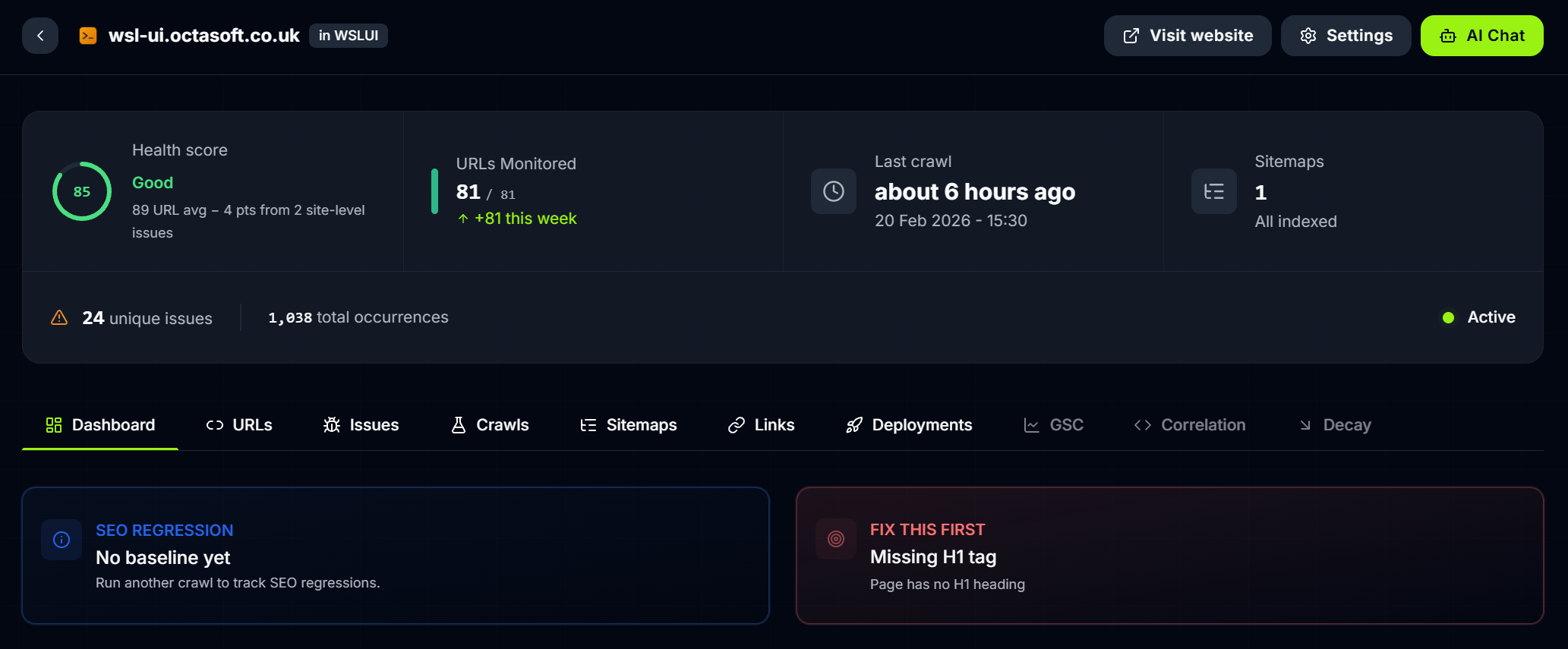
The dashboard immediately surfaced the headline numbers: 24 unique issues, 1,618 total occurrences, and a big red "Fix This First" callout for missing H1 tags. The health score showed "Good" overall, but that single high-severity issue was dragging things down.
What impressed me was the speed and depth. This wasn't a surface-level check of the homepage — Maptrics had crawled every blog post, every tag page, every series listing, and every documentation page.
The Report: 24 Issues Across 6 Categories
After chatting with the Maptrics founder, I was able to get a full export of the crawl report. Here's what it found, broken down by severity.
High Severity
The only high-severity issue was missing H1 tags on 35 URLs. These were mostly listing pages — tag pages, series pages, the blog index, and utility pages like downloads and themes. Blog posts themselves were fine because the post title renders as an H1, but the surrounding infrastructure pages had been overlooked.
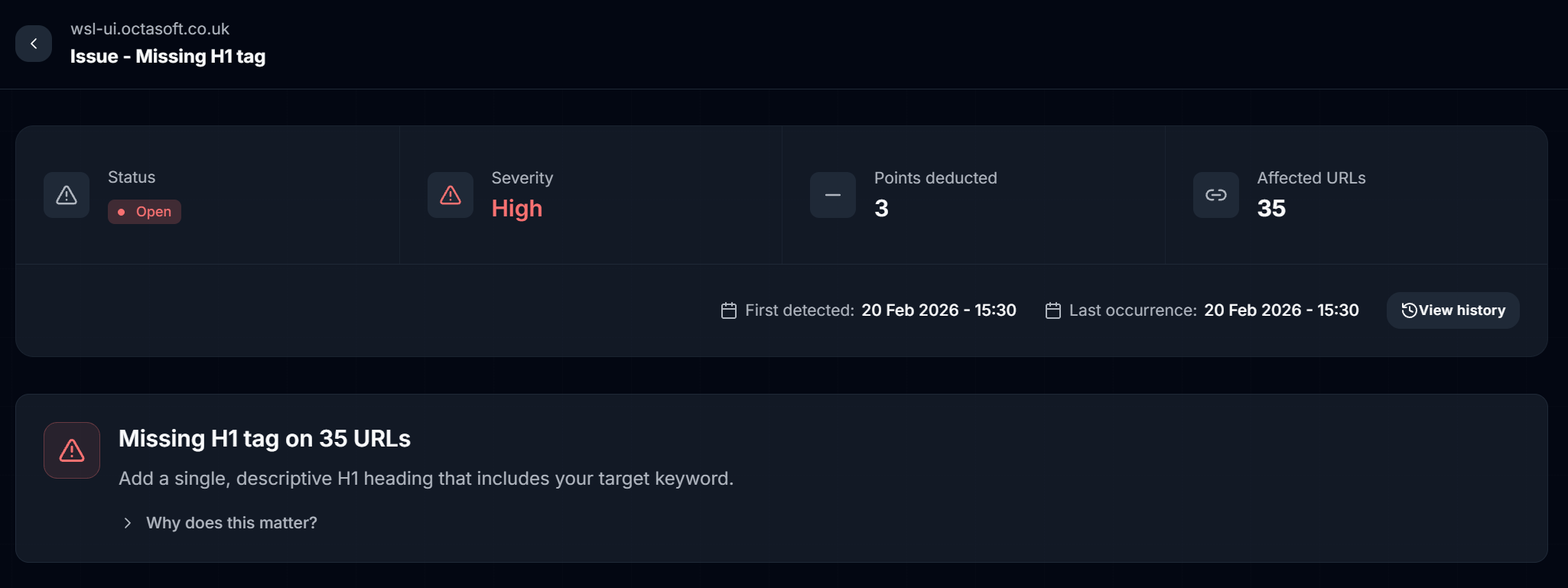
This is the kind of issue that's easy to miss. You build a tag page, it looks right visually, but there's no <h1> in the markup. Search engines use H1 tags as a primary signal for page topic — without one, you're leaving ranking potential on the table.
Medium Severity
Five medium-severity issues covered the core SEO metadata:
| Issue | URLs Affected | Impact |
|---|---|---|
| Title too short (< 55 chars) | 45 | Wasted SERP real estate |
| Meta description too short (< 120 chars) | 31 | Lower click-through rates |
| Missing OG image | 8 | No preview when shared socially |
| Slow page load (> 3s) | 11 | User experience and Core Web Vitals |
| Duplicate meta description | 1 | Confusing signals to search engines |
The title too short issue was the most widespread. Pages like /blog/tag/desktop had titles like "desktop - WSL UI Blog" — technically present, but too short to be effective. Search engines display around 55-60 characters in results, and a short title wastes that space.

One thing I appreciated about Maptrics was the "Why does this matter?" expandable section on each issue. Rather than just listing problems, it explains the SEO reasoning behind each recommendation. This turns a report into a learning opportunity.
Low Severity
The low-severity issues were a mix of Open Graph metadata gaps and content structure problems:
- Missing web app manifest on all 81 pages
- Broken heading hierarchy (e.g. H2 jumping to H4) on 78 pages
- Missing OG locale, site name, image dimensions across 50+ pages
- Title too long (> 60 chars) on 25 pages
- Meta description too long (> 160 chars) on 12 pages
Informational
The informational tier flagged patterns worth knowing about but not urgent:
- Image format not optimized (309 occurrences) — images that could use WebP/AVIF
- Thin content (< 300 words) on 34 pages — mostly listing pages, expected
- Missing breadcrumb schema on 37 pages
- Outdated year references on 12 pages

The Full Issue List
Here's the complete breakdown from the crawl report:
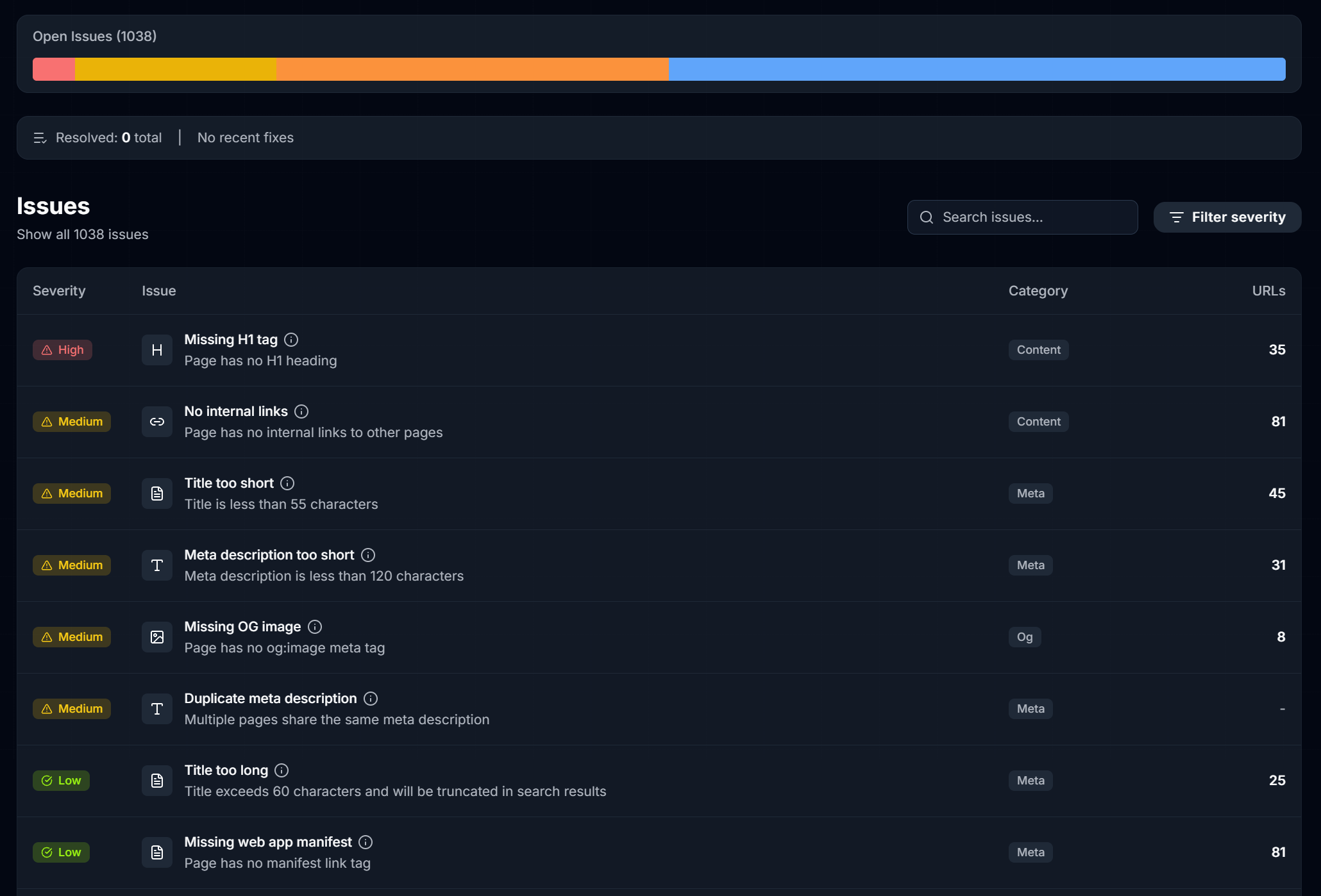
| Severity | Issue | Category | URLs |
|---|---|---|---|
| High | Missing H1 tag | Content | 35 |
| Medium | Title too short | Meta | 45 |
| Medium | Meta description too short | Meta | 31 |
| Medium | Missing OG image | OG | 8 |
| Medium | Slow page load | Technical | 11 |
| Medium | Duplicate meta description | Meta | 1 |
| Low | Title too long | Meta | 25 |
| Low | Missing web app manifest | Meta | 81 |
| Low | Broken heading hierarchy | Content | 78 |
| Low | Meta description too long | Meta | 12 |
| Low | Missing OG locale | OG | 51 |
| Low | H2 too long | Content | 1 |
| Low | Missing OG site name | OG | 51 |
| Low | Missing OG image width/height | OG | 8 |
| Low | Missing Twitter image | OG | 8 |
| Low | FAQ schema too few questions | Structured Data | 1 |
| Info | Image format not optimized | Images | 309 |
| Info | Missing OG image type | OG | 38 |
| Info | Thin content | Content | 34 |
| Info | Missing breadcrumb schema | Structured Data | 37 |
| Info | Outdated year references | Freshness | 12 |
That's a lot of data from a single crawl. The value isn't just in finding the issues — it's in the prioritisation. Maptrics separates signal from noise so you know what to fix first.
Fixing the Issues
Armed with the report, I worked through the high and medium severity issues first.
Missing H1 Tags
The fix was systematic: every page template that didn't include an <h1> got one. Tag listing pages got <h1>Posts tagged "tag-name"</h1>, series pages got the series name as an H1, and the blog index got a proper heading. The 35 affected URLs dropped to zero.
Title and Meta Description Lengths
For titles that were too short, I expanded them to include more context. /blog/tag/desktop went from "desktop - WSL UI Blog" to something more descriptive that used the available 55-60 character space. Similarly, meta descriptions below 120 characters were expanded to give search engines and users a fuller picture of what each page offers.
Open Graph Gaps
The missing OG images on series listing pages were an oversight — individual blog posts had OG images generated from their hero diagrams, but the series index pages didn't have a fallback. Adding a default OG image for these pages fixed the social sharing previews.
The Result
After addressing the high and medium severity issues, the site's SEO foundation is significantly stronger. The next step is to connect the Vercel deploy webhook so Maptrics can track regressions going forward — that way, if a code change accidentally removes an H1 tag or breaks a meta description, I'll know about it before Google does.
Why This Matters for Developers
Most developers treat SEO as a "set it once" task. You add meta tags to your layout, maybe generate OG images, and move on. But SEO is a living system — every time you add a page, refactor a component, or change a route, you risk breaking something.
The traditional approach is to run a manual audit every few months, discover a pile of issues that have been hurting your rankings for weeks, and scramble to fix them. Maptrics flips this by integrating SEO checks into your deployment pipeline. It's the same shift-left philosophy that transformed testing: catch problems at deploy time, not in production.
For a Next.js site like mine with 81 pages and growing, the automated crawl-on-deploy model is exactly right. I don't want to remember to run an SEO audit manually. I want to be told when something breaks.
Supporting a Startup
Maptrics is in beta, built by a small team at Pertti Studio. I used the free tier and got genuine value from it. The founder was responsive and helpful when I had questions — they even provided the full report export that powered most of this analysis.
If you're running a site and care about SEO, give Maptrics a look. The free tier covers small sites, setup takes five minutes, and the first crawl alone will likely surface issues you didn't know you had. For me, it found 24 issues I'd been silently accumulating across dozens of deployments.
The best tools don't just find problems — they help you understand why they matter. Maptrics does both.